Workspace Management
Organize Workspaces into Signal Trees
Falkonry TSI allows you to organize your workspaces into signal trees, similar to how rules are managed. This hierarchical structure helps you align your modeling and analysis activities with your operational or asset organization, making it easier to manage and navigate complex environments.
Creating a Workspace
When creating a new workspace, you can select a specific signal tree and assign the workspace to a particular node within that tree. This embeds your workspace within the relevant context, such as a plant, line, or machine, and enables you to group related models and analyses together.
To create a new workspace in Falkonry TSI:
-
Click on the Create Workspace button in the
All Workspacessection.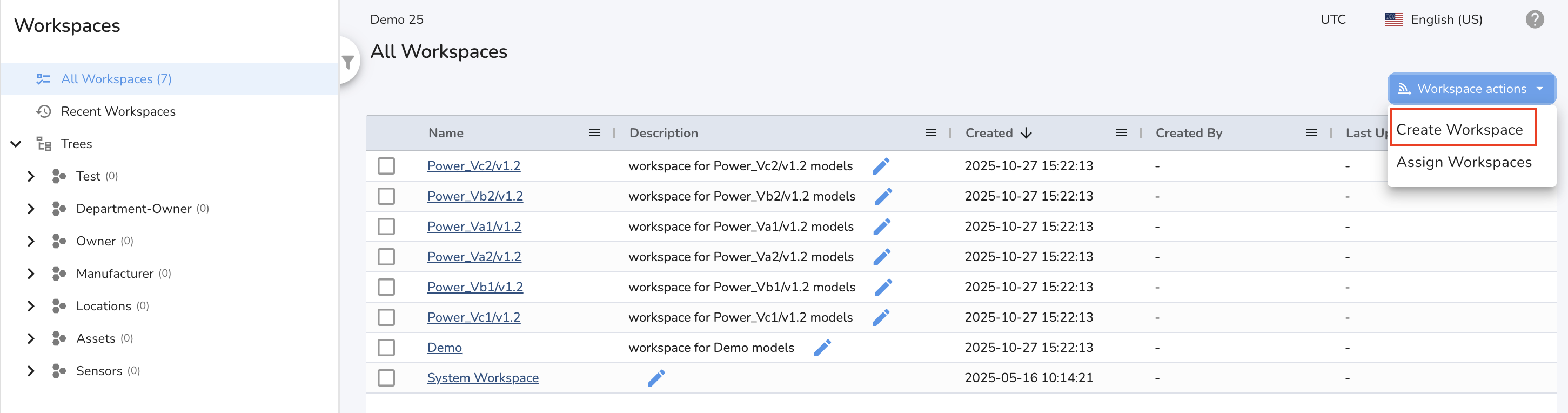
-
In the dialog that appears, enter a name and description for your workspace.
- (Optional) Assign the workspace to a signal tree by selecting the desired tree and node. This helps organize your workspace within the asset or process hierarchy from the start.
- Click Create to finish.
If you choose not to assign the workspace to a tree during creation, you can do so later:
- Select the workspace you want to organize.
- Click on Assign Workspace
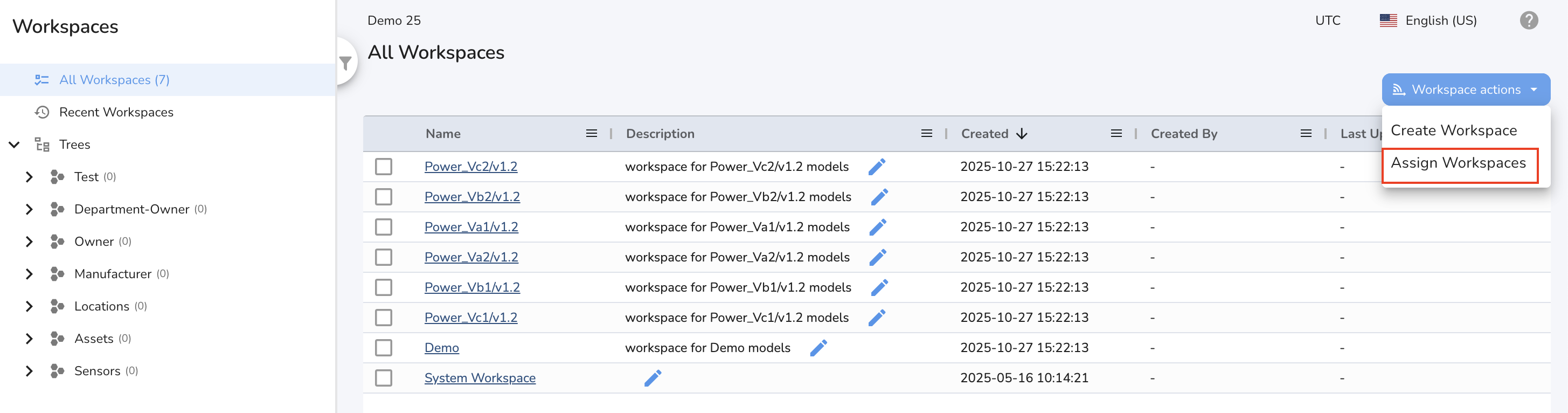
- Choose the appropriate tree and node, then confirm your selection.
This flexible approach allows you to organize and re-organize your workspaces as your needs evolve, ensuring your modeling environment always matches your operational structure.
Benefits of Hierarchical Workspace Organization
Intuitive Navigation
You can quickly locate and access workspaces in the context of specific assets, processes, or locations. The Workspaces UI displays workspaces grouped under these trees, making navigation straightforward.
Manageability and Scalability
By organizing workspaces within the asset hierarchy, you can efficiently manage a large number of workspaces, even as your operations grow. For example, you can create separate workspaces for each machine or process, or group them by line or plant as needed.
Contextual Modeling
Workspaces tied to the hierarchy ensure that models, calculations, and analyses are always relevant to the operational context. This makes it easier to interpret results and take action based on asset-specific insights.
No-Code Administration
Organizing and managing workspaces within signal trees can be done through the user interface, without requiring programming expertise. This empowers engineers and subject matter experts to structure their work in a way that best fits their needs.
Tip: Use signal trees to mirror your real-world asset or process structure for maximum clarity and efficiency in workspace management.